Microsoft Access 2010: What’s Exclusive!

With the latest release of Microsoft access 2010, Microsoft has made some critical additions to the feature set. Microsoft Access 2010 is one of the most extensively used office applications, primarily by IT professionals and enterprises. Microsoft Access is an RDBMS from Microsoft that basically provides a combined pool of Database management, software development tools, presented in a user-friendly GUI so that any programmer, developer or IT administrator can create, manage databases and build software applications by making use of the databases. Now, with the latest release of Access 2010, Microsoft has made some critical additions to the feature set and capabilities of Access 2007, making it more productive for IT professionals and business users.

Read more

Microsoft Office 2010 Product Key Card

Know everything about Office 2010 Product Key Card, installation and activation details, how to get a Product key card for upgrading to full Office 2010 version. Although Microsoft released Office 2010 last week for purchase through Online stores as well as retails outlets, another alternative way by which Microsoft has been providing trial version of Office 2010 to end consumers is by pre-installing Office 2010 on new computing devices(laptops, netbooks) sold by leading device manufacturers such as Dell, HP, Lenovo etc. The motive behind providing pre-installed Office 2010 trial version is to let people explore the latest features of Office 2010 and unlock the full features and capabilities by upgrading their Office suite  with a Product Key Card. Upgrading Office 2010 through a Product key card is something new for the 'Office' users as this method has been introduced for the first time by Microsoft so here's everything you need to know about Product key card, how to use it, where to find it and method to upgrade your Office 2010 trial version.

Read more

10 videos that Narrate Everything about “Office 2010”

Here's Office 2010 video tutorials, explaining all office applications such as word, excel, powerpoint. With close to 10 million beta testers of Office 2010, the latest productivity suite from Microsoft became a rage, much before becoming available for public release recently. Since Office beta got released, millions of people have got their hands on the latest features of Office 2010 and have been using Office 2010 during last 8 months or so. It wasn't surprising though that many beta testers found it a little tough to getting used to Office 2010 immediately. Also, people wanted to learn more about the features of office 2010, which they had never seen before. To address these concerns and create more excitement among the public for Microsoft Office 2010, Microsoft came up with some awesome introductory videos and training tutorials of Office 2010 applications. Hundreds of beta testers did their bit as well by uploading Office 2010 training videos on Youtube, helping other users understand and utilize the full capabilities of Office 2010. We went through all those videos out there and picked the best 10 "Must-Watch" videos about Office 2010 applications, which are enough to explain everything about Office 2010 features and capabilities. So, if you're geared up to dig more into Office 2010 applications and use your applications more efficiently, don't miss the videos featured below....

Read more

Office 2010 vs Office 2007

Head-to-head comparison chart between Office 2010 vs Office 2007, giving clear idea about the latest features in Office 2010. Since Office 2010 has gone out there for sale, a lot of folks have been repeatedly asking why they should buy the new Office version. In our last post, we answered this query by describing Office 2010 features in details. Still, a large chunk of people are asking: "What's so special about Office 2010 that's missing from Office 2007?" Office 2007 vs Office 2010 Compatibility In other words, many folks are just looking for a head-to-head comparison chart between Office 2010 and office 2007, detailing what's new Office 2010 has to offer to existing Office 2007 users. So, there you have a quick and clear comparison chart between Office 2007 and Office 2010, giving bit-by-bit comparison of Office 2010's latest added features over Office 2007.

Read more

Top 10 reasons Why ‘Office 2010’ is a ‘Must Have’ Productivity suite

The article enlists MS Office 2010 features and advantages. Top 10 reasons why office 2010 is a must-buy software. As Office 2010 has finally been made available to the users worldwide, everyone is asking just one question.... Is Office 2010 worth a buy ? As we've been busy covering every bit of information, news and updates surrounding Office 2010 since it got announced back in 2009, we've certainly got the answer to the question quoted above. Without much ado, let's get down to real stuff... Below are the Top 10 reasons why Office 2010 is a 'Must-have' productivity suite and why you shouldn't give it a miss ! Here we go !

Read more

“Over 1 billion People Rely on MS Office”….Fact or Hype ??

Total number of MS office users has reached over 1 billion. Here's the truth behind this extrapolated figure of 1 billion Office users This week, we witnessed yet another launch of the next successor of the 'Office productivity suite', Office 2010. It surely is a great software package for individual as well as enterprise users but few things that were quoted during the consumer launch of Office 2010 were a little tough to digest. One such statement that raised a lot of eyebrows is... "1 billion people rely on Office to get things done at work, home and school" Now Office productivity suite is surely one of the oldest softwares in Technology business and one of the widely accepted softwares as well but 1 billion people ? That sounds a little over the board. Well, here's the truth behind this extrapolated figure of 1 billion Office users

Read more

Download Office 2010

Download Office 2010. Microsoft Office 2010 has finally been made available for consumers worldwide. Microsoft Office 2010 has finally been made available for consumers worldwide. Millions of users have already bought the latest version of most trusted productivity application in the world and enjoying high productivity with new experience like never before. Users can choose from three…

Read more

Office Web Apps on Skydrive Soon to come on Hotmail !

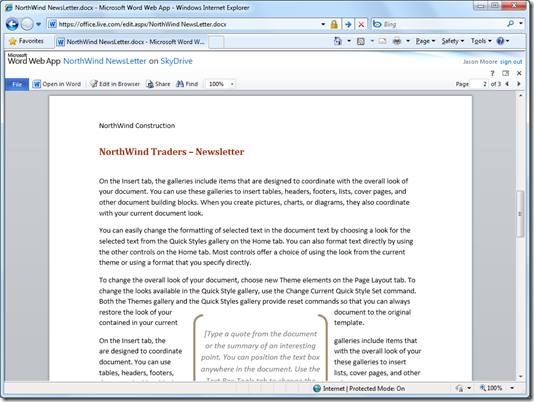
Office web apps on Skydrive cloud storage service and they are very much accessible by the users from now onwards. As promised by Microsoft Office team couple of weeks back, Office web apps are finally integrated into Skydrive cloud storage service and they are very much accessible by the users from now onwards. Although Jason Moore, Principal Lead Program Manager, Windows Live SkyDrive has written on the official blog that the integrated service has been made available to US, UK, Canada and Ireland users at this point of time but it's working absolutely fine for users belonging to any country as well. You may not get a language customized version of Office web apps for now but that's also on the way, quotes Jason in the announcement post. So from now on, you can start working on your office documents right through your web browser and start sharing your content across the web, no matter how large the shared file(s) may be. This is actually the biggest advantage of Skydrive integration with Office web apps as the files being shared are stored within your Skydrive account and whenever you share your files with someone else, the recipient gets to see the cloud hosted version of that file and therefore doesn't even require a download to see the file. File size can therefore go upto 10 GB, which is enormously huge. This way, file download becomes an option, no more a compulsion to the users.

Read more

This Pop-up Is Included in the Theme
Best Choice for Creatives
Purchase Now