

Windows 8 is the newest version of OS launched by Microsoft. The features and details about Windows 8 along with Windows 8 release date.
Android OS has been long dominating the tablet world since its inception. Big giants like Blackberry, HP failed to launch an OS that could emerge as a winner against Google’s Android. Apple’s iOS has also done a commendable job as a tablet based OS. But this time the ruler in the world of operating systems has stepped forward to enter the tablet OS race.
Yeah, you got it right. This time its Microsoft with its latest version of Windows, Windows 8. Windows 8 is Microsoft’s first attempt to make an operating system suited for a tablet though it will work equally well on normal computers.
Windows 8 can run on a 1GHz processor with only 1Gb RAM(32-Bit) and on any DirectX 9 compatible graphics card with WDDM 1.0 or higher driver. It takes it less than 10 seconds to boot up to a ready-to-work environment.
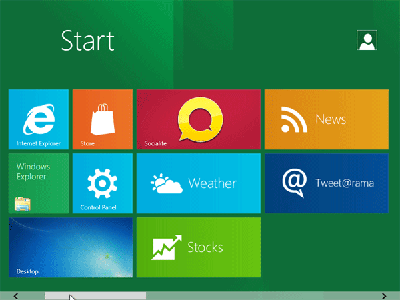
Windows 8 boots up to a screen with bottle green background with a lot of tiles of apps,one being the desktop tile, which slightly resembles the tiles on Windows Phone 7. These tiles contains a few leisurely and addictive game coupled with a few usefuls apps like Socialite which helps you connect to your social networking sites. A windows appstore has also been introduced but has not yet started.
The tiles screen can also be accessed by pressing the Windows key on the keyboards. Clicking on the desktop tile takes you to the normal working desktop which is a bit different from the desktop we saw on Windows 7.
The Start Button is replaced with a black square with the Windows logo on it. Just bringing the mouse pointer over the Start button get you options like Settings, Control Panel, etc. Clicking on the Start Button takes you back to the tiles screen. The shape of all the windows is perfectly rectangular with sharp corners unlike the curved edges we used to see with the earlier versions of windows.
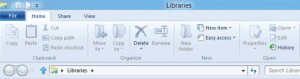
The Menu bar has been done away with and the ribbon style UI has been introduced. This UI is very similar to the one we’ve been using with Microsoft Office 2007/2010. Clicking on any file changes the options available on the ribbon accordingly.
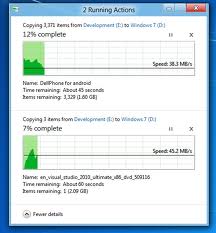
Copy paste operation is now all the more interactive and shows real-time graphs of the copy speed. Moreover, more than one copy/move tasks are paired into the same window and there is an option of pausing any copy/move operation. The applications on the tiles screen need not to be exited, they get suspended(and are automatically exited after a time), though they can be manually closed from the task manager.
If more than two applications are running they can be switched through by just dragging the whole screen from left to right or vice-versa. Apart from these features we also see the new Internet Explorer 10.
As only the developer preview is released not much can be commented on the stability or compatibility. Taking the UI and the ease of operation into consideration, Windows 8 seems like a perfect OS designed for Handheld tablets as well as desktop PCs. Well, we’ll have to wait till 2nd Quarter of 2012 to see where Windows 8 stands in the tablet OS race. You can download the Windows 8 Developer Preview here.
Windows 8 Release Date
While Windows 8 got previewed at Microsoft’s BUILD conference in September this year, the Beta version of Windows 8 will soon be available to interested early birds and Beta release could be as early as start of the next year.
Given the whole track of process-stages and events that line up for any product launch by Microsoft, we can expect the next version of Windows, codenamed Windows 8, to hit the retail market by fall next year. We will update this article with the exact date of release as and when Microsoft makes an official announcement.
Keeping up with routine maintenance like an ActiveX test will ensure your gadgets run properly!
