Share This Article
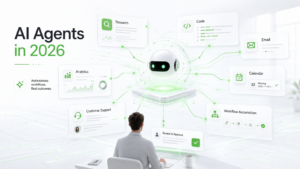
Artificial intelligence has changed how people search, write, analyze data, create images, and build software. The next major shift is not only about receiving better answers from a chatbot. It is about allowing AI to complete a sequence of tasks on the user’s behalf.
This trend is known as agentic AI or AI agents.
A normal chatbot responds to one prompt at a time. An AI agent can understand a larger goal, divide it into smaller tasks, choose tools, perform actions, check progress, and continue until the job is complete.
For example, instead of asking AI to write one email, a user could ask an agent to research potential customers, organize the information in a spreadsheet, prepare personalized drafts, and submit everything for approval.
AI agents are appearing in business software, coding platforms, customer support systems, marketing tools, and productivity applications. However, they are not perfect digital employees. They can misunderstand instructions, use incorrect information, or take an unexpected action. Clear boundaries, limited permissions, testing, and human supervision are therefore essential.
This guide explains how AI agents work, where they can be useful, and how beginners can start using them safely.
Table of Contents
What Is an AI Agent?
An AI agent is a software system designed to work toward a goal with limited step-by-step guidance.
The user explains the desired result, and the agent decides how to complete the work. Depending on the tools connected to it, an agent may be able to search the web, read documents, edit files, update spreadsheets, send messages, run code, access databases, or interact with business applications.
A simple AI chatbot normally follows this process:
- The user enters a question.
- The chatbot generates an answer.
- The user reviews the response.
- The process ends or continues with another prompt.
An AI agent may follow a longer process:
- The user defines a goal.
- The agent analyzes the request.
- It divides the goal into smaller tasks.
- It decides which tools are required.
- It performs the tasks one by one.
- It checks the results.
- It corrects errors when possible.
- It asks for approval before important actions.
- It delivers the final output.
This ability to plan and act is what makes an AI agent different from a basic chatbot.
AI Agents vs AI Chatbots
AI agents and chatbots often use similar language models, but their purpose is different.
A chatbot is mainly designed for conversation, explanation, and content generation. It may answer questions, summarize an article, write a paragraph, or help solve a problem.
An AI agent is designed to complete a workflow.
For example, a chatbot can tell you how to organize a meeting. An AI agent may check calendars, identify suitable time slots, prepare the agenda, create the event, and send invitations after receiving approval.
A chatbot can write a product description. An AI agent may collect product data from a spreadsheet, write descriptions for every item, check the formatting, upload the drafts to a content management system, and notify the user when the work is ready for review.
A chatbot can explain a coding error. A coding agent may inspect a project, locate the source of the problem, edit multiple files, run tests, and prepare a summary of the changes.
The main difference is simple: chatbots usually provide answers, while agents are designed to take actions.
How Do AI Agents Work?
Most AI agents combine a language model with planning, memory, and tools.
Language Model
The language model helps the agent understand instructions, interpret information, and generate responses. It acts as the reasoning and communication layer of the system.
Planning
Planning allows the agent to divide a large goal into smaller steps.
For example, if the goal is to create a competitor report, the agent may decide to:
- Identify five competitors
- Visit their websites
- Collect pricing information
- Compare important features
- Organize findings in a table
- Write a summary
- Recommend the strongest options
Tools
Tools allow the agent to perform actions outside the chat window.
These tools may include:
- Web browsers
- Search engines
- Email accounts
- Calendars
- Spreadsheets
- Databases
- Coding environments
- Customer relationship management systems
- Project management software
- Document editors
Without tools, an agent can only generate text. With tools, it can interact with applications and complete practical work.
Memory
Some agents can remember information during a task or across several tasks. Memory helps the agent avoid repeating work and maintain context.
For example, a sales research agent may remember which companies have already been checked. A support agent may use previous messages to understand a customer’s current issue.
Feedback and Evaluation
Advanced agents may review their own work before presenting it. They can check whether all requested steps were completed, whether the output follows the required format, or whether any information is missing.
Self-checking can improve results, but it does not guarantee accuracy. Human review is still important.
Common Uses of AI Agents in 2026
AI agents can support many types of work. The strongest use cases are repetitive, clearly defined, and easy for a person to review.
Research and Market Analysis
A research agent can gather information from several sources, compare facts, and prepare a structured report. It may support competitor research, product comparisons, technology monitoring, supplier research, and customer feedback analysis.
For example, a business owner could ask an agent to compare ten email marketing platforms. The agent might collect pricing, automation features, support options, and limitations before presenting the findings in a table. Important details should still be verified because prices and policies can change.
Digital Marketing
Marketing teams can use agents for keyword research, competitor analysis, content planning, campaign reporting, brand monitoring, and lead qualification.
An SEO team could provide a list of websites and ask an agent to check topic relevance, publishing activity, contact pages, and other qualification signals. The agent could then organize the results in a prospecting sheet.
Mass outreach should not be fully automated without review. Poor personalization can harm a brand and may violate email or platform rules.
Customer Support
A support agent can read a customer’s question, search a knowledge base, suggest troubleshooting steps, categorize the ticket, and prepare a response.
Common, low-risk questions may be suitable for automation. Refund disputes, legal complaints, account security issues, and emotionally sensitive cases should be sent to trained staff.
Software Development
Coding agents can inspect projects, explain unfamiliar code, find bugs, write tests, update documentation, and implement small features.
A developer might ask an agent to add a search filter to an application. The agent could identify relevant files, make the change, and run tests. A developer should still review the result for security, performance, and unexpected behavior.
Administrative Work
Agents can summarize meetings, prepare agendas, organize documents, update spreadsheets, categorize emails, create task lists, and generate weekly reports. These tasks are often good starting points because they are easy to check and usually involve limited risk.
How to Start Using an AI Agent
You do not need to automate an entire business. Begin with one simple workflow.
Step 1: Choose a Repetitive Task
Select a task you already understand. It should be repetitive, time-consuming, easy to review, based on clear rules, and low risk if a mistake occurs.
Good examples include summarizing reports, organizing spreadsheet data, researching companies, preparing meeting notes, or drafting social posts. Avoid starting with payments, legal decisions, account deletion, employee evaluation, or confidential customer data.
Step 2: Define the Final Result
Avoid vague instructions such as “do research” or “improve my marketing.” Explain exactly what the finished work should contain.
For example:
Research five project management platforms for a team of 20 people. Compare their features, pricing structure, limitations, and customer support. Present the findings in a table and recommend the three strongest options. Do not purchase anything.
This instruction defines the scope, output, and action limit.
Step 3: Provide Useful Context
The agent needs background information to make relevant decisions. For software research, mention team size, budget, required features, existing tools, technical experience, and important restrictions.
Without this context, the result may be accurate but too general to be useful.
Step 4: Set Clear Boundaries
Tell the agent what it can and cannot do. Useful rules may include:
- Use only public information
- Do not send emails or publish content
- Ask before changing or deleting anything
- Stop when important information is missing
- Label uncertain claims
- Never enter payment details
Boundaries become more important when an agent is connected to business accounts.
Step 5: Connect Only Necessary Tools
Give the agent the minimum access required. A research agent may need public websites and a spreadsheet, but it probably does not need access to payments, private email, cloud storage, or customer databases.
Restricted accounts are safer than administrator access.
Step 6: Test With Sample Data
Test the workflow on a small sample before using real business information.
Check whether the agent understands the goal, follows the correct steps, uses reliable information, produces the required format, handles missing data, and stops when approval is required. Run the same workflow several times because AI outputs can vary.
Step 7: Add Human Approval
Require approval before the agent sends messages, publishes content, changes records, deletes files, makes purchases, changes permissions, or shares confidential information.
The agent can prepare the work while a person controls the final action.
Step 8: Measure the Results
Track time saved, error rate, correction rate, cost per task, output quality, and how often human help is required.
An agent that works quickly but creates frequent errors may not provide real value.
Example Prompt for a Research Agent
Here is a practical instruction for a technology research agent:
Act as a technology research assistant. Identify five important developments in artificial intelligence, cybersecurity, consumer electronics, and business software from the last seven days. Use reliable sources. For each development, provide the event date, a short summary, why it matters, and the original source. Clearly label rumors or unconfirmed claims. Do not copy full articles. Prepare a draft report for human review and do not publish it automatically.
This instruction gives the agent a role, subject area, time period, output structure, quality standard, and safety boundary.
When Not to Use an AI Agent
Some tasks are unsuitable for agent automation. Avoid giving an agent final control over medical decisions, legal judgments, major financial transactions, employee discipline, or emergency responses.
These situations require qualified human judgment and clear accountability. An agent may still help collect information or prepare a draft, but a responsible person should review the evidence, consider the wider context, and make the final decision.
Important Risks of AI Agents
AI agents can save time, but they also introduce new risks.
Incorrect Actions
An agent may misunderstand the user’s goal and complete the wrong task. Detailed instructions and approval points reduce this risk.
Hallucinated Information
AI systems may generate facts that sound convincing but are incorrect. Important information should be checked against original sources.
Data Privacy
Connecting an agent to private files, customer information, or internal documents can expose sensitive data. Review privacy settings and access rules before connecting confidential systems.
Security Risks
An agent with broad permissions may become a security problem. Use restricted accounts, strong authentication, activity logs, and limited access.
Unexpected Costs
Agent workflows may make repeated AI requests and use several connected tools. This can cost more than a single chatbot response. Set usage limits and monitor spending.
Over-Automation
Not every task should be automated. Work involving empathy, negotiation, legal judgment, employee decisions, or major financial consequences should remain under close human control.
Poor Customer Experience
Customers may become frustrated when an agent gives repetitive or irrelevant answers. Make it easy for users to reach a human when the AI cannot solve the problem.
Best Practices for Safe AI Agent Use
To use AI agents responsibly, follow a few simple principles.
Start small. Choose one workflow and test it carefully before expanding.
Keep permissions limited. Give the agent access only to the tools and information it needs.
Require approval for important actions. Drafting is safer than automatic publishing or sending.
Maintain activity logs. You should be able to review what the agent did and when it did it.
Review results regularly. Do not assume that a workflow will continue working correctly forever.
Protect sensitive data. Avoid uploading confidential information unless the platform and workflow are properly secured.
Create a backup plan. Users should know what to do when the agent fails or produces an unclear result.
The Future of AI Agents
AI agents are likely to become a normal part of everyday software.
Instead of manually moving information between different applications, users may increasingly describe the result they need and supervise an agent while it completes the process.
A manager may ask for a weekly performance report, and the agent may collect information from project tools, spreadsheets, and communication platforms before preparing a summary.
A marketer may ask for a campaign review, and the agent may compare performance data, identify changes, and suggest the next actions.
A developer may describe a feature, and a coding agent may prepare the code, tests, and documentation for review.
This does not mean that humans will become unnecessary. Human work will continue to be important for setting goals, understanding context, checking quality, handling unusual situations, and accepting responsibility for final decisions.
The most effective users will not be those who automate everything. They will be the ones who understand which tasks can be delegated, which tasks require supervision, and which decisions should remain completely human.
Final Thoughts
AI agents are one of the biggest technology trends of 2026 because they move artificial intelligence from answering questions to completing multi-step workflows.
They can assist with research, marketing, customer service, software development, and administrative work. Their greatest value comes from repetitive tasks that follow clear rules and are easy to review.
Beginners should start with one low-risk workflow, define the expected result, limit tool access, test with sample data, and require approval for important actions.
AI agents should be treated as supervised assistants, not completely independent employees. Humans must remain responsible for judgment, security, quality, and final decisions.
Used carefully, agents can save time and simplify digital work. Used without proper controls, they can create errors, privacy problems, and unnecessary costs. The technology is powerful, but its value depends on responsible design and oversight.