Share This Article
Somewhere around the time a startup’s second backend server goes live, someone draws a box on the whiteboard and labels it “proxy.” A year later, there are four of those boxes, they all do different jobs, and nobody can say for sure which one is to blame when every customer in the logs seems to have the same internal IP address.
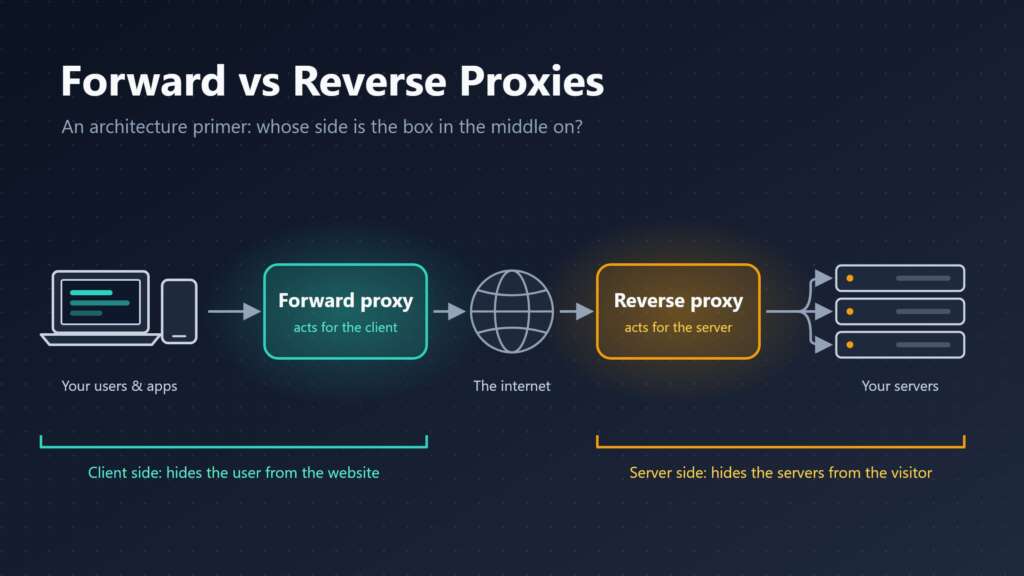
Part of the confusion is the word itself. “Proxy” covers two different pieces of infrastructure. Both sit in the middle of a connection and pass traffic along. The difference is whose side they’re on.
If the basics are a little fuzzy, ProxyEmpire has a useful explainer on what a proxy server is, including how an HTTPS request gets tunneled through one. This article picks up from there and looks at the architecture: where forward and reverse proxies sit in a real product, what each one is good for, and the mistakes that tend to show up in production.
Table of Contents
The Short Version
A forward proxy acts for the client. A reverse proxy acts for the server.
That’s genuinely most of it.
A forward proxy is something the client, or the client’s network administrator, chooses to send traffic through. It reaches out to the internet on the client’s behalf.
A reverse proxy is something the website operator puts in front of their own servers. It receives visitors’ requests and forwards them to the appropriate backend.
One hides the client from the website. The other hides the servers from the visitor.
Forward Proxies: The Client’s Agent
Start on the client side.
That client might be a browser, a scraper, a backend service calling a partner API, or a laptop on an office network. Instead of connecting directly to the destination, it connects to the proxy and tells it where it wants to go.
The proxy opens its own connection, makes the request, and hands the response back. From the destination’s perspective, the connection generally comes from the proxy’s address rather than the client’s original address.
How much the proxy can see depends on the traffic.
With a plain HTTP request, the proxy can read and potentially modify the request and response. With HTTPS, the client commonly asks the proxy to establish a tunnel, allowing the encrypted connection to pass through without the proxy reading the application payload.
The proxy can still observe certain connection details, such as the destination host in many configurations, the port, and the amount of traffic transferred.
An exception occurs when an organization configures authorized TLS inspection and installs a trusted certificate on managed devices. In that situation, the proxy may decrypt and inspect traffic. Without the appropriate trust configuration, certificate errors may occur.
For a startup, forward proxies usually turn up for four reasons.
1. Egress Control
Production servers have no business talking to the entire internet without restrictions.
Route outbound traffic through a proxy with an allowlist containing approved destinations, such as a payment processor, email API, or error-tracking service. Requests to unapproved destinations can then be blocked according to the organization’s policies.
If a compromised dependency tries to contact an unfamiliar domain, the request can be stopped at the proxy.
This approach can support security monitoring and compliance requirements, particularly when a startup begins working with enterprise customers.
2. A Stable Outbound IP Address
Banks, government APIs, and larger enterprise customers sometimes accept connections only from IP addresses they have explicitly allowlisted.
Autoscaled containers with changing addresses can make this difficult.
Sending outbound requests through infrastructure with a stable public IP address gives the partner a consistent address to trust. A forward proxy can provide this arrangement, while a NAT gateway can solve a similar problem at the network layer.
The right choice depends on whether the application needs simple address translation or additional proxy-level controls.
3. Network Policy
The classic office web filter is a forward proxy.
Organizations use forward proxies to enforce browsing policies, restrict access to particular destinations, and monitor outbound traffic.
Remote-first startups may have less need for traditional office web filtering, but network controls remain relevant as companies grow and face enterprise security reviews.
4. Accessing Public Web Data From Different Locations
Products that monitor prices, track search rankings across cities, verify advertising placements, or collect public web data for analysis may need requests to originate from particular geographic locations.
Commercial proxy networks support these use cases through pools of residential, mobile, or datacenter IP addresses.
For data-intensive startups, proxy infrastructure can become an important part of the collection pipeline. It should be monitored for success rates, response times, reliability, and compliance with applicable laws and website terms.
Reverse Proxies: The Server’s Front Door
Now flip the arrangement around.
A reverse proxy sits in front of your servers. Your domain’s DNS points to it, visitors connect to it, and it decides which backend should handle each request.
Most visitors never know it is there.
In HTTP architecture, a gateway and a proxy have distinct technical meanings, although the industry commonly uses the term “reverse proxy” for this server-side arrangement.
Nginx, HAProxy, Caddy, Envoy, and Traefik are common choices. Managed cloud load balancers and content delivery networks can also perform reverse-proxy functions.
That last point surprises some founders: plenty of startups have used a reverse proxy since day one without configuring one directly because their hosting platform provides it automatically.
The main jobs of a reverse proxy include the following.
1. TLS Termination
TLS certificates can be managed at the reverse-proxy layer instead of separately on every application server.
The proxy handles the external HTTPS connection and forwards requests to backend services. Depending on the security requirements, the connection between the proxy and the backend can use private-network HTTP or encrypted HTTPS.
Centralizing certificate management can simplify operations, although internal encryption may still be necessary for security or compliance reasons.
2. Load Balancing and Health Checks
A reverse proxy can distribute incoming requests across multiple application instances.
If one instance becomes unavailable, the proxy can stop sending traffic to it, depending on its health-check and failure-detection capabilities.
Load balancing also helps teams deploy application updates with less disruption when combined with appropriate deployment and health-check strategies.
For official implementation details, see the NGINX documentation on reverse proxies.
3. Caching and Compression
Static files and selected API responses can be served directly from the proxy or an associated caching layer without sending every request to the application.
This can reduce backend workload and improve response times.
Compression can also reduce the amount of data transferred over the network.
However, caching must be configured carefully. Responses containing personalized information should not be shared between users unless the caching rules explicitly make that safe.
4. Protection and Traffic Management
Rate limits, access-control rules, and some web application firewall policies can be enforced before requests reach the application.
A content delivery network is effectively a reverse-proxy system distributed across multiple locations, often with additional caching and security capabilities.
This makes CDNs a common first line of defense against traffic spikes and certain types of malicious traffic.
A reverse proxy is not a complete security solution on its own, but it provides a useful control point.
5. Request Routing
A reverse proxy can route different parts of a website to different backend services.
For example:
/apican route to an API service./blogcan route to a hosted content management system.- Other paths can route to the frontend application.
This allows a business to operate several services behind one domain.
It can also help a team gradually separate components of a monolithic application without forcing users to interact with multiple domains.
Same Software, Different Seat
Here’s what trips people up: the mechanics of forward and reverse proxies are similar, and some software can perform both roles.
Squid is best known as a forward proxy but also supports reverse-proxy configurations. Envoy is commonly used in both directions.
You cannot reliably identify the role simply by looking at the software.
Instead, ask two questions.
Who chose to put the proxy there?
If the client or the client’s network administrator configured it, it is generally a forward proxy. If the website operator placed it in front of the application’s servers, it is a reverse proxy.
Whose identity or infrastructure is it protecting or representing?
A forward proxy acts on behalf of clients. A reverse proxy acts on behalf of servers.
There is also a third case worth knowing about: the transparent or interception proxy.
A network can insert this type of proxy into the traffic path without requiring the client to configure it explicitly. Some corporate networks and managed environments use this approach.
It generally performs a forward-proxy role, even though the client may not be aware of its presence.
Following a Single Request
Tracing one request through a typical startup stack helps explain why the number of proxies involved is often higher than expected.
Imagine a user at a large company in Berlin opens your application.
Their request may follow this path:
- The request leaves the user’s device through the employer’s forward proxy.
- It reaches your CDN, which performs reverse-proxy functions.
- The CDN forwards the request to your load balancer, another reverse proxy.
- If you use a service mesh, a sidecar proxy may handle communication next to the application service.
- Your application requests data from a third-party API, and that outbound call may pass through an egress forward proxy.
That is four or five proxy-related components involved in a single user interaction, depending on the architecture.
It is completely normal.
The trouble starts when something breaks and nobody has documented the full request path.
The Mistakes That Bite in Production
1. Logging the Wrong IP Address
Behind a reverse proxy, application logs may show the proxy’s IP address instead of the original visitor’s address.
Proxies often pass client-address information through headers such as X-Forwarded-For or the standardized Forwarded header.
The application must interpret these headers correctly.
Rate limits, fraud checks, geolocation, and audit logs can all depend on identifying the original client accurately.
2. Trusting Forwarding Headers From Anyone
This is the other side of the same problem.
A forwarding header is just request data, and an external client can supply a forged value.
If an application blindly trusts whatever address appears in X-Forwarded-For, an attacker may be able to bypass IP-based restrictions by submitting different addresses.
Only trust forwarding information supplied by known proxies that you control or explicitly trust. Configure your application framework to recognize the correct proxy addresses and header-handling rules.
This is particularly important for applications with sensitive endpoints or IP-based access controls.
3. Timeouts That Do Not Line Up
Every layer has its own idle and request timeouts.
Long-running exports, large uploads, streaming responses, and WebSocket connections can fail at whichever layer has the shortest applicable timeout.
The result may be a 502 or 504 error that appears to happen randomly.
Document the timeout settings at each hop and make sure they match the application’s expected behavior.
For genuinely long-running jobs, consider moving processing to a background queue and allowing the client to retrieve the result separately.
4. Caching What Should Not Be Cached
A reverse proxy that caches responses using an insufficient cache key can serve one user’s personalized content to another visitor.
Use appropriate Cache-Control headers and configure the cache to respect the application’s authentication and personalization requirements.
Treat user-specific responses as private by default unless you have deliberately designed a safe shared-caching strategy.
5. Forgetting That the Egress Path Exists
A new integration works on a developer’s laptop but fails in production because the outbound allowlist does not include the new destination.
Worse, an error generated by your own proxy may resemble an error from the external service. Developers can waste hours contacting the wrong support team.
Keep egress policies documented and version-controlled alongside the systems that depend on them.
For startups building API-driven products, understanding how applications communicate with external services is equally important. TechPluto’s guide on what APIs are and how they shape the banking and financial sector provides additional context on how APIs connect different systems.
What to Set Up, and When
The right proxy architecture depends on the startup’s stage, workload, and security requirements.
Before Launch
Start with your hosting platform’s managed load balancer and automatic certificate management where available.
Consider putting a CDN in front of the application if it needs caching, global content delivery, or additional traffic protection.
Avoid operating a separate fleet of reverse proxies unless you have a clear reason to manage that infrastructure yourself.
When You Get Your First Enterprise Customers
Review outbound traffic controls and stable outbound IP requirements.
Configure trusted proxies properly and make sure client IP information is passed correctly from the edge to the application logs.
Enterprise customers may also require evidence of access controls, monitoring, and network security practices.
Your security requirements should guide the implementation rather than adding infrastructure simply because other companies use it.
When You Start Running Several Services
Consider an API gateway when multiple services need centralized routing, authentication, rate limiting, or policy enforcement.
A service mesh may become useful when service-to-service communication, observability, and security policies become difficult to manage independently.
However, a service mesh introduces additional components and operational complexity. For a team of five engineers running a handful of services, that overhead may not be justified.
When Your Product Depends on Large-Scale Web Data
If your product collects public web data across several markets, plan the proxy layer early.
Treat commercial proxy networks as production infrastructure, with monitoring for success rates, response times, and reliability by target and country.
Use responsible collection practices, respect website terms, and comply with applicable privacy and data-protection requirements.
The Mental Model to Keep
A forward proxy speaks for your clients. A reverse proxy speaks for your servers.
Most production systems use both, often with several instances of each along the same request path.
When something goes wrong, draw that path end to end. Label every component according to its role, then check what each hop can see, which headers it forwards, and where the request can fail.
The goal is not to eliminate proxies. It is to understand why each one exists, what responsibility it owns, and how it affects the traffic passing through it.
That clarity makes infrastructure easier to debug, secure, and scale as the startup grows.