

Whether you are a student, researcher, or business individual, there is a strong possibility that you may come across the need to transform a bulk of plain text into a PDF file for easy sharing and accessibility.
In such a case, there is no need to get worried; this is because technology has provided an excellent and quick option to get this task done. Wondering how?
In this blog post, we will be discussing a step-by-step procedure in detail, along with pictorial demonstrations for easy understanding.
Also Read: How to Save PDF as JPEG
How to Convert Bulk Text into a PDF File
The process of converting plain text into a PDF file is simple and straightforward; all you need to do is follow the steps below.
1. Pick a Text to PDF Converter
To quickly and efficiently get the job done, you are required to find and pick a reliable text-to-PDF converter. It is an online tool that is specifically designed to transform plain text into shareable and professional-looking PDF files.
On the internet, there is a huge variety of such converters available; you can pick any based on your specific needs and preferences. However, make sure your chosen one is reliable.
Here are a few factors that you can consider to make the selection process easier:
- Good rankings: You should go with a text-to-PDF converter that has a decent ranking (probably ranking on the first page) on Google search results. A better ranking usually indicates that the tool is actually providing value to its audience.
- Free & No Limitations: Opt for a tool that is 100% free to use. It should not have any sort of limitations, especially regarding the number of words. This is because you are converting bulk text…right?
- Formatting Options: Before converting the text into PDF, you may want to increase the font size of headings, make some information bold, etc. That’s why you should look for a text-to-PDF converter that offers formatting options.
By paying attention to these factors, you can easily select a decent text-to-PDF conversion tool.
2. Enter the Plain Text & Format it Properly
Once the converter is selected, all you need to do is simply provide the required text to it. You can either directly copy/paste the text in the input box or upload the document from local storage.
For demonstration purposes, we selected Text to PDF converter by Imagetotext.io. After entering text, this is how its interface looks:
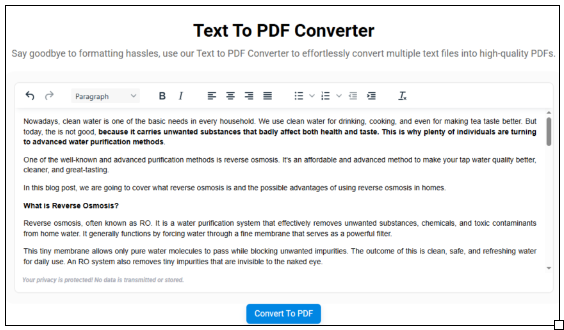
Now, start formatting the content as per your specific needs and requirements.
3. Start Conversion to Get Results
When everything is done, you can proceed to click the “Convert to PDF” button. And within a matter of seconds (depending on your internet connection stability), the tool will automatically download the converted file.
4. Download & View
Obviously, after conversion, you will get the option to download the PDF file. It is important to view it at least once to ensure it is perfectly converted as per your needs and preferences. This is because sometimes online tools can also make mistakes due to technical issues/bugs.
So, that’s how you can quickly and efficiently convert bulk plain text into a shareable and professional-looking PDF file.
Final Notes
Many people get confused when they come across the need to convert bulk text into a PDF file. Fortunately, there is a quick and easy solution available. By utilizing an online text-to-PDF converter, you can get the job done within seconds. All you have to do is enter the text, click the button, and download the final file.
We are hopeful that you will find this guide useful and authentic.
Frequently Asked Questions
Why do I need to transform text into a PDF?
Well, there can be numerous reasons. For instance, PDF is one of the most preferred document formats used globally, and it preserves the overall quality and formatting.
Can I transform bulk content into a PDF file?
By utilizing the right online tool and following the aforementioned approach, you can efficiently transform bulk text into a PDF file with minimal effort.
Are text-to-PDF converters safe and secure?
Yes, most of the converters available on the internet are fully secure and reliable, which means you can use them without any doubts.
